
CBAM software for exporters. The number your importer files, with the arithmetic attached.
CBAM reporting software for the installation operator outside the EU: your installation, its production processes, the goods you export per CN code and the precursors behind them — calculated into specific embedded emissions your buyer’s declarant can use and an accredited verifier can re-trace.
Last updated: November 2026 · Reflects Implementing Regulations (EU) 2025/2547, 2025/2620 and 2025/2621
CBAM software is not a filing tool for your importer. It is how an installation outside the EU produces a number a verifier can follow back to the invoice.
What CBAM software must do for an operator outside the EU.
The legal obligations sit with the EU importer. The calculation sits with you. Implementing Regulation (EU) 2025/2547 sets out how the operator of an installation calculates the emissions embedded in its goods, and any CBAM compliance software for exporters has to cover the same ground.
Model the installation, not the company
CBAM is installation-level. The declaration names the specific plant where the goods were made, so the software has to hold each production site as its own installation with its own boundary, its own fuels, electricity and process emissions, and its own reporting period. A company-wide average is not an answer an importer can use.
- One installation per production site, even when two share an address.
- Fuel combustion and process emissions kept as separate lines.
- Electricity consumption with the factor applied to it and where that factor came from.
- Production recorded in tonnes, month by month.
Tie every production process to the goods it makes
Inside the installation, emissions are attributed to production processes, and each process to the CBAM goods it produces, identified by CN code. The same product made by two routes carries two different numbers, so the production route has to be recorded with the good. CBAM software that only stores a total per site cannot produce a specific figure per good.
Roll up the precursors behind each good
Complex goods carry the embedded emissions of the precursors that went into them: billets in aluminium profiles, crude steel in wire, clinker in cement. The software has to take the precursor quantities and their own specific embedded emissions into the calculation.
- Purchased precursors use the supplier’s actual data when you have it, and a Commission default value when you do not.
- Precursors made in the EU count as zero embedded emissions, but their quantities are still reported.
- Precursors of unknown origin fall back on the separate defaults the Commission publishes for that case (Annex IV to Implementing Regulation (EU) 2025/2621).
Calculate SEE, direct and indirect
The output is the specific embedded emissions of each good, in tCO₂e per tonne. Direct emissions cover combustion and process emissions in production, including heat produced outside the installation. Indirect emissions cover the electricity consumed.
Which part your importer pays on depends on the sector: iron and steel, aluminium and hydrogen are charged on direct emissions only; cement and fertilisers are declared with direct and indirect emissions. Good CBAM software keeps both visible either way, because buyers outside the CBAM calculation often ask for the full figure.
Show defaults honestly, then hand over the evidence
Default values are country- and year-specific and carry a mark-up, so the software has to know which default applies to which precursor, for which year, and say plainly where a default is standing in for actual data. Then it has to produce what the importer and the verifier work from:
- The operator’s emissions report — the Commission publishes a recommended Excel template whose
Summary_Communicationsheet carries what the declarant needs. - A calculation trace per good, so the accredited verifier can follow each figure to its inputs. The first site visit by the verifier is, in principle, always physical.
- Evidence of any carbon price effectively paid in the country of origin, if your importer will claim the deduction.
Every good, its embedded emissions and what is still missing — on one screen.
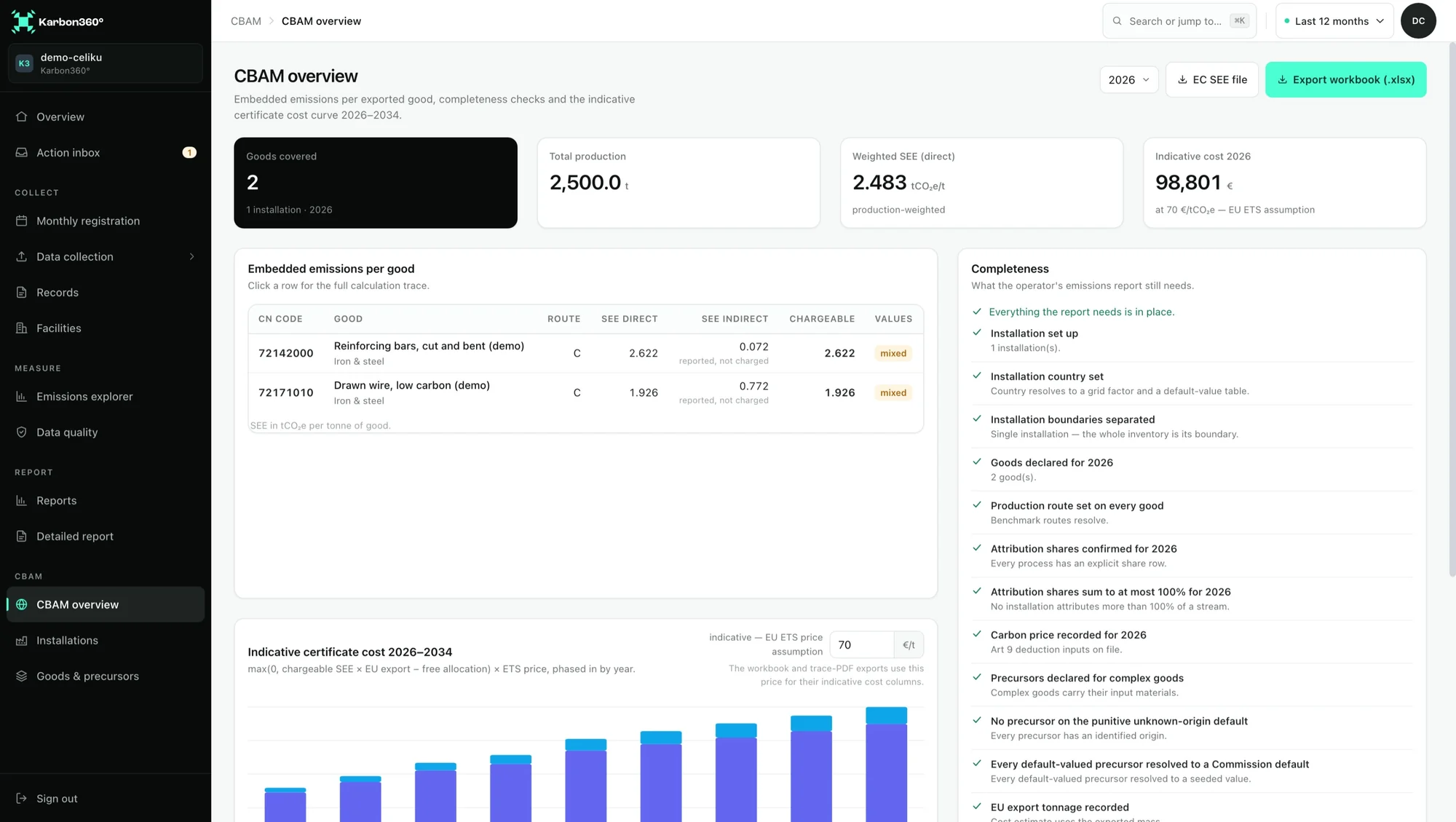
The CBAM overview lists each good you export with its CN code, production route, specific embedded emissions and the share of precursors behind it. Completeness checks run before your importer asks, and the indicative certificate cost curve shows what the number means for your buyer through 2034.
- Goods and precursors per CN code, with a live CN lookup
- Commission default values per country and year, mark-up applied
- Completeness checks per installation and good
Open any good. The arithmetic is right there.
Specific embedded emissions per CN code, the formula in full, the system boundary, each inventory stream and the precursors behind it. This is the view a verifier follows, and it exports as a trace PDF next to the operator’s emissions report workbook.
- Formula shown in full, not summarised
- Factor and default-value versions pinned, so a past report still reproduces
- Exports the Commission’s own communication template, prefilled
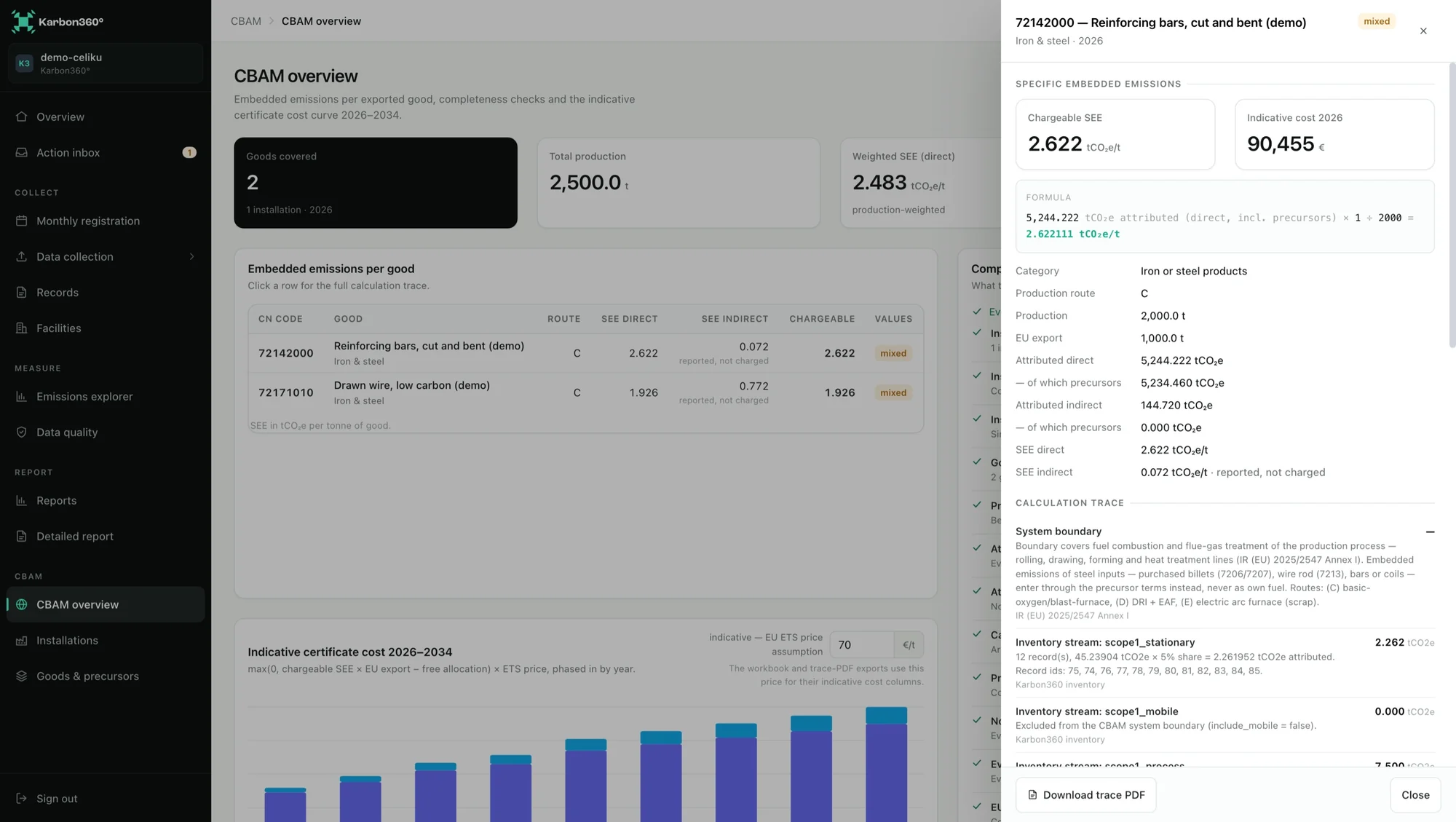
= 2.622111 tCO₂e/t
Spreadsheet, consultant or CBAM software?
All three can produce a CBAM figure. They differ in who carries the work each month and what is left when someone asks where a number came from.
Three ways to produce an operator’s CBAM data
Definitive period| Spreadsheet | Consultant | Karbon360 | |
|---|---|---|---|
| Who does the monthly work | Your team, by hand | The consultant, usually once a year | Your team enters or scans records; the platform calculates. Or our team, under Managed CBAM |
| Default values per country and year | Copied in manually; mark-ups easy to miss | Applied by the consultant | Built in, with the mark-up for the year applied |
| Precursor roll-up | Formulas you maintain | Done in the consultant’s own workbook | Purchased, in-house and EU-origin precursors handled per good |
| Trace for the verifier | Depends on who built the file | Depends on the consultant | A trace per good, from figure back to source document |
| Next year | Rebuilt, often by someone else | Paid for again | Same installation, same structure, new period |
| Judgement on hard cases | Yours | The consultant’s real strength | Methodology built in; Managed CBAM and training if you want people on it |
Built for the supplier side of CBAM.
Karbon360 is carbon management software built in the Western Balkans for exporters whose EU customers now need installation-level data.
Steel and aluminium producers
Cement and clinker plants
Exporters a buyer has already asked
Teams without the capacity
From a CBAM request to a traced figure.
Set up the installation
Add goods and precursors
Record the month
Hand over the evidence
CBAM is in the Compliance & Export plan.
The CBAM module — installations, processes, goods and precursors per CN code, embedded emissions with the full trace, the operator’s emissions report workbook, EU default values and the certificate cost curve to 2034 — is part of Compliance & Export at €699 a month. Groups go on Enterprise; Managed CBAM is quoted per installation.
What exporters ask about CBAM software.
Do I need CBAM software if my importer files the declaration?
The importer files, but the importer cannot calculate your installation’s emissions. Only the operator of the installation can monitor and calculate them under the CBAM method and have them verified. If you do not, your buyer has to use default values, which carry a mark-up and usually cost them more.
Does the EU approve CBAM software?
No. The CBAM rules accredit verifiers, not software, and Karbon360 does not claim any EU approval. What gets verified is your installation’s data and calculation, by an independent accredited CBAM verifier. Good software makes that review short; it does not replace it.
Does Karbon360 produce the official CBAM report template?
It produces the operator’s emissions report workbook and a per-good trace PDF, and it can export the Commission’s own communication template prefilled with your installation, processes, goods and purchased precursors. The template is recommended by the Commission rather than compulsory.
What if my suppliers will not give me precursor data?
You can combine actual data for your own process with Commission default values for purchased precursors. If you know the country of production, the default for that country applies with the year’s mark-up; if you do not, the separate defaults for unknown origin apply. Karbon360 marks every place a default stands in for actual data.
Which goods and sectors does it cover?
Iron and steel, aluminium, cement and fertilisers goods, with their precursors. Electricity is not modelled as a CBAM good.
Can you run CBAM for us instead?
Yes. Managed CBAM is the same platform operated by our team: you forward the invoices, production figures and shipping papers, and we keep the installation current, request precursor data from suppliers and produce the operator’s report each period. It is quoted per installation, in writing.
- European Commission — Carbon Border Adjustment Mechanism
- European Commission — CBAM legislation and guidance
- European Commission — CBAM Questions and Answers (definitive period)
- Implementing Regulation (EU) 2025/2547 — methods for calculating embedded emissions (EUR-Lex)
- Implementing Regulation (EU) 2025/2621 — default values (EUR-Lex)
- Regulation (EU) 2023/956 establishing the CBAM (EUR-Lex)
Be the supplier whose CBAM data gets used.
Installation, processes, goods and precursors set up once, recorded every month, and a trace behind every figure before your buyer’s declarant has to ask twice.