
Scope 1 and 2 emissions calculator: fuel and electricity in, tonnes of CO₂e out.
Enter a year of electricity in kWh and what you spend on fuel. The calculator splits the result into Scope 1, the fuel your company burns, and Scope 2, the electricity it buys, and shows it as a screening range. Below it: the formulas, the two Scope 2 methods and what a real inventory adds.
- 1Your fuel and electricity
- 2Your emissions estimate is ready
- 3Estimated annual footprint
Your fuel and electricity
Annual figures from your invoices. This is a screening estimate of Scope 1 and 2, not an inventory.
How Scope 1 and Scope 2 are calculated.
Scope 1 vs Scope 2 emissions
The GHG Protocol Corporate Standard sorts a company’s emissions into scopes. Companies report Scope 1 and Scope 2 at a minimum; Scope 3 covers the rest of the value chain.
- Scope 1 covers direct emissions from sources the company owns or controls: stationary combustion in boilers, furnaces and generators, mobile combustion in company vehicles, and process emissions from production chemistry.
- Scope 2 covers indirect emissions from the generation of purchased electricity, steam, heat and cooling consumed by the company. The emissions happen at the power plant; they are yours because you bought the energy. See Scope 2 emissions.
Electricity from your own diesel generator is not Scope 2: the fuel it burns is Scope 1.
The Scope 1 and Scope 2 formulas
Both scopes use the same shape: activity data times an emission factor.
Scope 1 (t CO₂e) = Σ fuel quantity × emission factor of the fuel ÷ 1,000
Scope 2 (t CO₂e) = Σ electricity (kWh) × grid emission factor (kg CO₂e/kWh) ÷ 1,000
Fuel quantities are litres, cubic metres, kilograms or kWh from your invoices, and each fuel has its own factor. Process emissions use tonnes produced and a process factor instead of a fuel quantity. The emission factor carries the CO₂, methane and nitrous oxide of the activity, converted to CO₂e.
This calculator takes a shortcut on Scope 1: it starts from euros spent rather than litres, which is why it gives a range. An inventory uses the quantities on the invoice.
Location-based vs market-based Scope 2
The GHG Protocol Scope 2 Guidance describes two methods. The location-based method uses the average emissions of the grid where the electricity was consumed. The market-based method reflects the electricity a company has chosen through contracts and certificates.
The calculator and Karbon360 both apply the location-based method, with the grid of the facility’s country. Because Western Balkan grids range from hydro-heavy to lignite-heavy, the country you pick changes the Scope 2 result more than any other input.
Whose emissions count
Before adding up, a company sets its organisational boundary: which sites and vehicles are in. Karbon360 inventories use the operational-control approach of the GHG Protocol, so a site you run is in, whether you own the building or rent it. For a first estimate, include every facility you operate and every vehicle you fuel.
Scope 1 or Scope 2? The cases that trip people up.
Common classification questions
GHG Protocol| Situation | Scope | How to enter it |
|---|---|---|
| Diesel for a back-up generator | Scope 1 | Enter the generator’s fuel under stationary combustion, not the electricity it made. |
| Diesel for company trucks and vans | Scope 1 | Mobile combustion, by litres from fuel cards or receipts. |
| LPG for forklifts | Scope 1 | Mobile combustion; mind litres versus kilograms. |
| Grid electricity | Scope 2 | Monthly kWh from the invoice, times the grid factor of the facility’s country. |
| District heating | Scope 2 | Delivered energy from the bill, under heating and cooling. |
| Own solar panels | Neither | Enter only the electricity bought from the grid. |
| Shared building with one meter | Scope 2 | Enter your share and note the method used to split it. |
| Employees’ own cars for commuting | Scope 3 | Category 7, employee commuting, from a staff survey. |
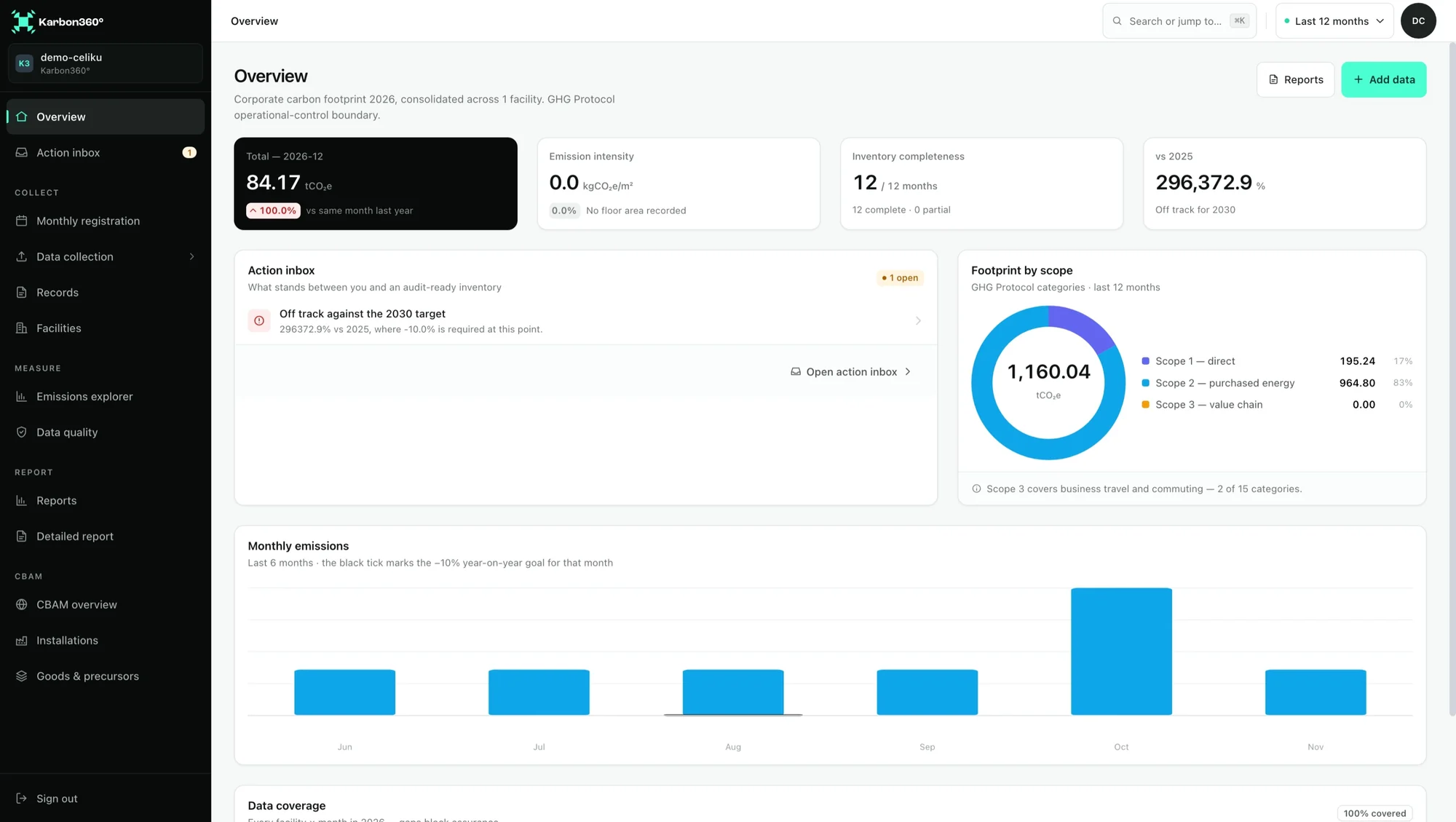
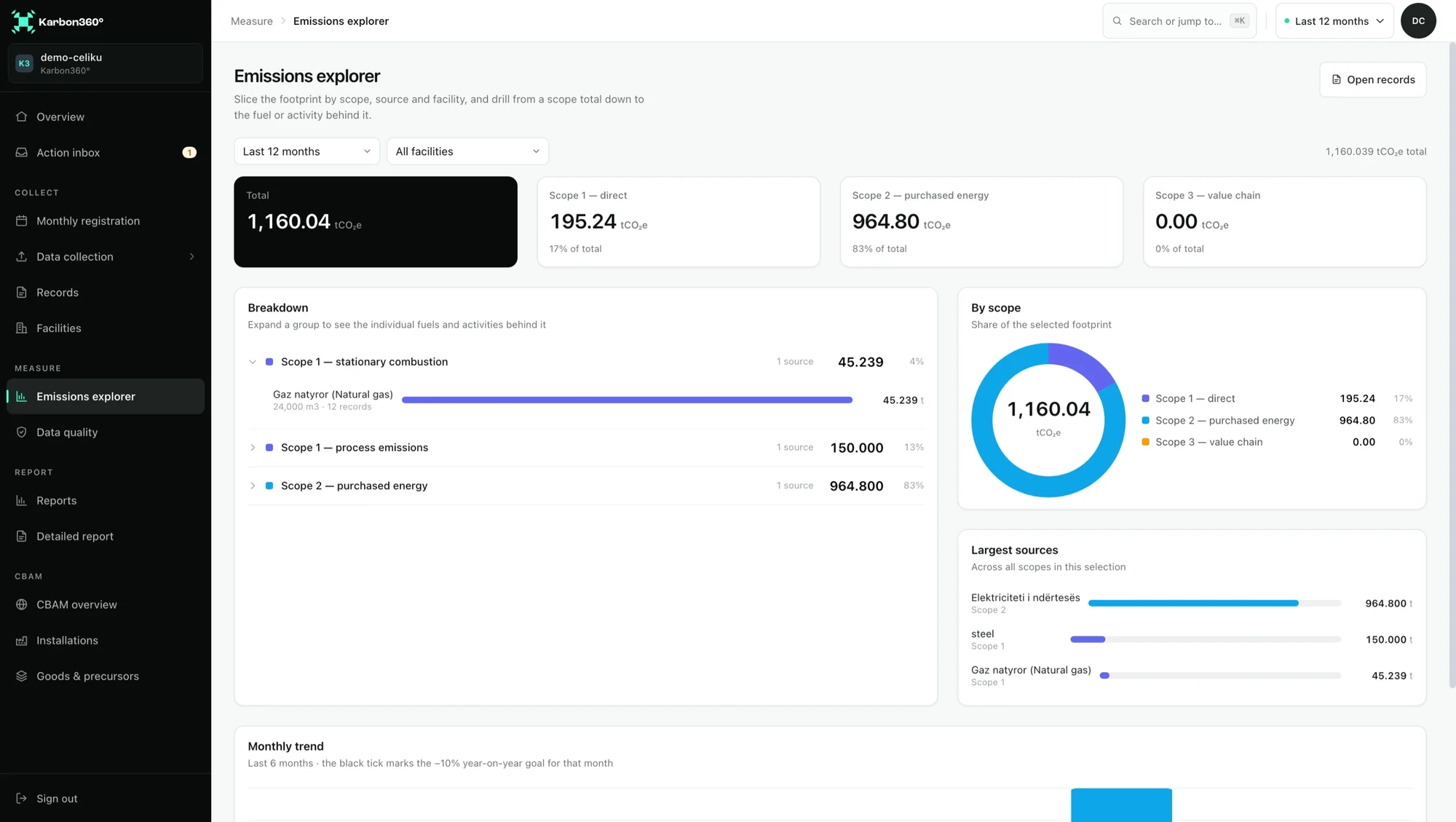
Scope 1 and 2, down to the fuel behind each total.
In Karbon360 the scope totals are not typed in. They are the sum of monthly records, each built from an invoice or meter reading, each calculated with a factor that names its source and version. Open a scope and you see the fuels and activities behind it; open a record and you see the document.
In the demonstration inventory: natural gas in Scope 1, stationary combustion, from 24,000 m³ over 12 records, process emissions as their own line, and purchased electricity as Scope 2.
- Scope breakdown by fuel and activity
- Factor, version and source on every record
- Location-based grid factor for each facility’s country
Calculating Scope 2 from your invoices, step by step
Collect twelve bills
Read the kWh
Apply the factor
Add and document
Frequently asked questions
What is the difference between Scope 1 and Scope 2 emissions?
Scope 1 is emissions from sources you own or control, such as fuel burned on site and company vehicles. Scope 2 is emissions from producing the electricity, steam, heat or cooling you buy. Your own generator’s fuel is Scope 1, grid electricity is Scope 2.
What is the Scope 2 emissions formula?
Electricity consumed in kWh multiplied by the grid emission factor in kg CO₂e per kWh for the country where it was consumed, divided by 1,000 for tonnes. That is the location-based method.
Is this Scope 1 and 2 calculator free?
Yes, with no login. You enter a work email to see the result, and we send it to you with the evidence list for your situation.
Why is the result a range?
Because it starts from fuel spend and a rough per-country electricity midpoint. The range runs 35% either side of the central estimate. An inventory built from invoice quantities and your country’s factor removes most of that uncertainty.
Does the calculator include Scope 3?
No. It covers Scope 1 fuels and Scope 2 electricity. Karbon360 inventories cover Scope 1, Scope 2 and Scope 3 categories 6 and 7, business travel and employee commuting.
Turn the estimate into a Scope 1 and 2 inventory.
Twelve months of invoices per facility, the grid factor for each facility’s country and a calculation trace behind every total.